
An outfit transition camera that lines up every cut
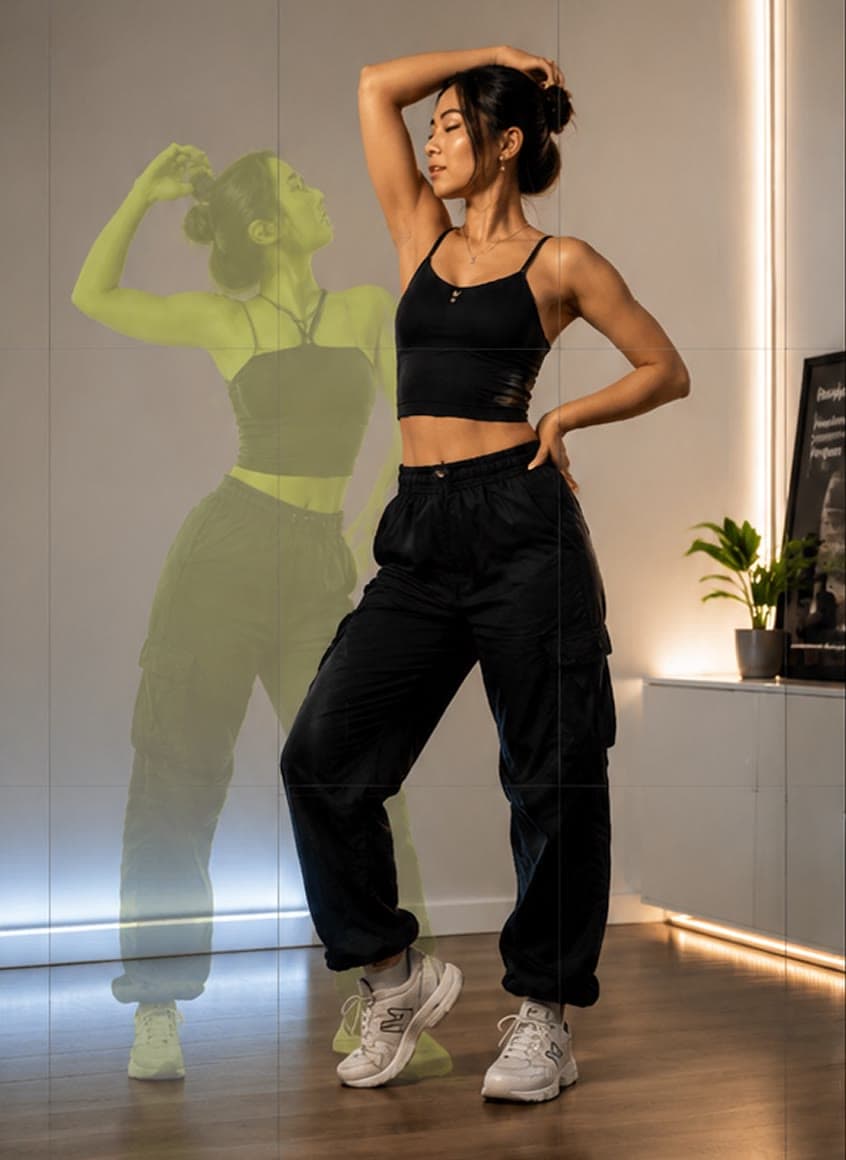
An outfit transition looks smooth when the second clip starts in exactly the same pose and position as the first ended. MatchFrame shows the previous clip as a ghost while you record, so you step back into the same spot and frame, then merge the clips into one video ready for TikTok or Reels.
Why these shots usually don't line up
Between outfits you move the phone, change the light and forget the exact pose. Even a small shift makes the cut jump. People tape marks on the floor or film everything in one take, which limits what you can do.
How to shoot it with MatchFrame
- 1
Film the first outfit
Switch to Clip, set up the phone and record. Hands-free capture lets you start recording without touching the phone.
- 2
Change and step back in
Open the next clip; the first clip's frame appears as a ghost. Match your pose and position.
- 3
Record the second outfit
Repeat for as many outfits as you like. Each clip becomes the ghost for the next.
- 4
Merge and export
Select clips in order and merge them into one 9:16 video.
Tips
- Use a motion to hide the cut, such as a jump, a spin or covering the lens.
- End each clip and start the next in the same pose.
- Keep the phone in the same place; the overlay shows you instantly if it moved.
- Use the Reels grid to keep your face clear of on-screen buttons.
Export it
Merge clips into a single 9:16 video, or show outfits side by side in a grid for a comparison post.
Export layoutsQuestions
What's the trick to smooth outfit transitions?
Match the ending pose of one clip with the starting pose of the next, keep the phone in the same place, and cut on a motion. A ghost overlay of the last clip makes the matching easy.
Can I add music in MatchFrame?
MatchFrame merges and exports the clips. Add music in TikTok, Instagram or your editor when you post.
Features used
- Video transitionsFilm each clip with the last one as a ghost overlay, so outfit changes, room reveals and match cuts land on the same frame. Then merge them in MatchFrame.
- Ghost overlay cameraMatchFrame shows your last photo or clip as a ghost on the live camera, so each shot matches its angle, distance and pose. Free on iPhone and Android.
- Export layoutsTurn aligned shots into a ready-to-post before/after: side by side, slideshow, GIF or grid, in 9:16, 4:5, 1:1 or 16:9, with labels, dates and your own text.
Other use cases
- Fitness progress photosTake gym and weight-loss progress pictures from the same spot, height and pose every time. Last week's photo as a ghost overlay replaces tape on the floor.
- Skincare before and afterSmall skin changes only show when light, angle and distance match. Use your last close-up as a ghost overlay to document a routine consistently.
- Hair growth progress photosTrack hairline, crown or length with photos taken from the same angle and distance. A ghost overlay of the last photo keeps every session comparable.
- Room makeover before and afterShoot your renovation, decor or declutter project from the exact same corner. The before photo as a ghost overlay lines up walls, windows and furniture.
- Dance videos for TikTokFilm TikTok dance videos and transitions on one phone: the last clip's end pose as a ghost overlay. Merge your takes or play 4 at once in a grid video.
- Consistent product photosKeep the same angle, distance and position across a catalog, a listing refresh or a before/after, using a reference shot as a ghost overlay on your phone.
Take your reference shot today.
Free on iPhone and Android. No account needed.