
A camera overlay app that shows your last shot
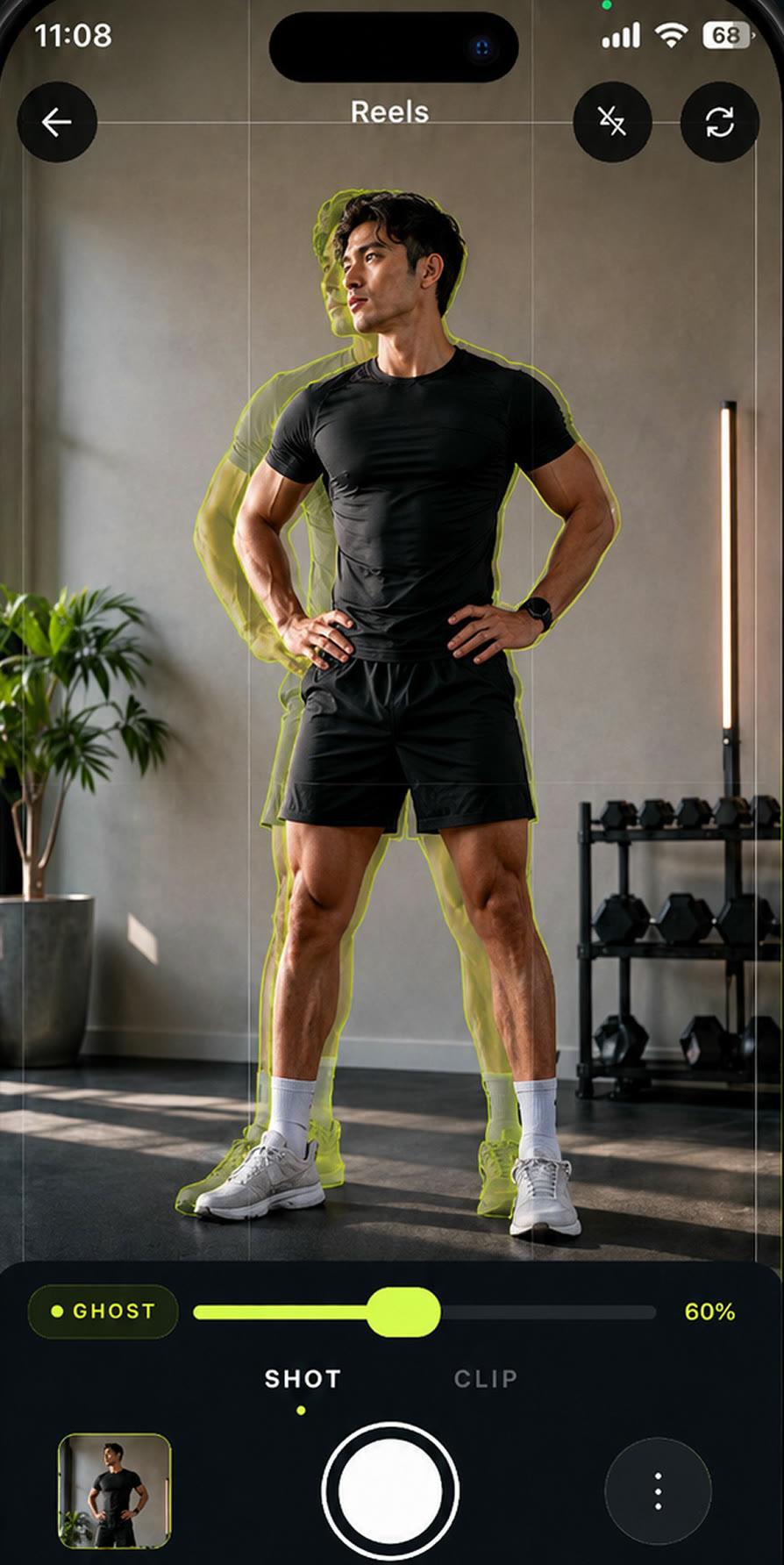
MatchFrame's ghost overlay places your previous photo or clip over the live camera as a see-through layer. You line the scene up with it, then shoot, so the new shot keeps the same angle, distance, height and pose. It works for photos and short clips, on iPhone and Android.
How it works
- 1
Open a project
The latest shot in the project becomes the ghost. You can also pick any photo or clip from your library as the reference.
- 2
Set the opacity
Drag the ghost slider until you can see both the camera and the reference. Around 35% works for most scenes; hold to pin a value.
- 3
Line up and capture
Move the phone, not the overlay, until outlines meet. The shutter takes the photo; switch to Clip to record video.
What's included
- Move, scale, color or black and white
- Drag and pinch the overlay to reposition it, switch between fit and fill, and show it in color or black and white for contrast.
- Guides and grids
- Face, body, product and frame guides keep the subject in the same place, and a Reels grid helps frame vertical video.
- Tilt alignment
- Auto-align reads the phone's tilt and tells you when it matches your last shot, so the camera angle doesn't drift between sessions.
- Lighting check
- If you shoot at a different time of day than the reference, MatchFrame warns you, because changing light hides real change.
- Hands-free capture
- Use the timer or tap anywhere on screen to shoot. Pro adds interval capture every 5, 10 or 30 seconds and zoom lock.
- Alignment score
- After each shot you get a score from Weak to Perfect, with what to fix next time: overlay, aim, framing or light.
Good for
- Fitness progress photosTake gym and weight-loss progress pictures from the same spot, height and pose every time. Last week's photo as a ghost overlay replaces tape on the floor.
- Outfit transition videosFilm outfit changes for TikTok and Reels with the last clip as a ghost overlay, so your pose, position and framing match at the cut. Merge clips in the app.
- Consistent product photosKeep the same angle, distance and position across a catalog, a listing refresh or a before/after, using a reference shot as a ghost overlay on your phone.
Questions
What does ghost overlay mean in a camera app?
It's a semi-transparent copy of an earlier photo or clip shown on top of the live camera. You use it as a guide to recreate the same framing before you take the new shot.
Can I use an old photo or video as the overlay?
Yes. Pick any photo or clip from your library as the reference image. It stays pinned until you clear it or switch back to the project's own shots.
Does the overlay appear in my saved photo or video?
No. The ghost is only a guide in the viewfinder; the photo or clip you save is the camera image alone.
Other features
- Before/after compareCompare any two shots in a MatchFrame project with a slider or side by side. They were aligned with the ghost overlay, so the difference you see is real.
- Export layoutsTurn aligned shots into a ready-to-post before/after: side by side, slideshow, GIF or grid, in 9:16, 4:5, 1:1 or 16:9, with labels, dates and your own text.
- Video transitionsFilm each clip with the last one as a ghost overlay, so outfit changes, room reveals and match cuts land on the same frame. Then merge them in MatchFrame.
Take your reference shot today.
Free on iPhone and Android. No account needed.