
How to take fitness progress photos that line up every week
Good progress photos come from the same spot, camera height, distance, pose and light every time. MatchFrame keeps them consistent by showing last week's photo as a ghost over the camera: you step into the outline, match the pose and shoot. Front, side and back shots stay comparable for months.
Why these shots usually don't line up
Progress pictures usually go wrong because something besides your body changed: the phone was ten centimetres lower, the light came from a different window or you stood half a step closer. Those differences are larger than a few weeks of real change, so the comparison mostly shows the camera.
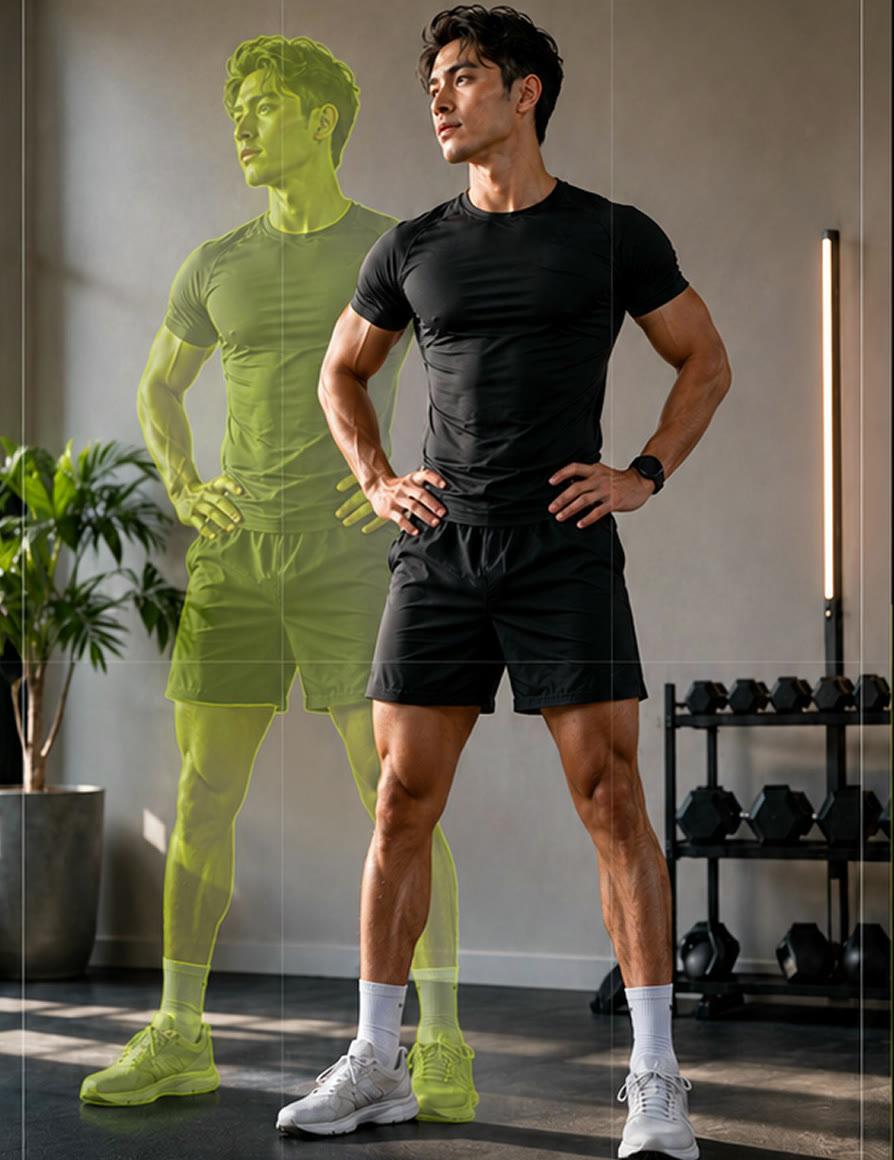
How to shoot it with MatchFrame
- 1
Pick a fixed spot
Use the same wall and the same window light. Shoot at roughly the same time of day; MatchFrame warns you when the light differs from your reference.
- 2
Take the reference set
Shoot front, side and back. Use the timer or hands-free capture so you don't have to hold the phone.
- 3
Shoot every week with the ghost
Open the project, set the ghost to about 35% and step into your outline before each shot.
- 4
Compare and export
Slide between week 1 and today, then export a 4:5 post or a 9:16 story with Day labels.
Tips
- Prop the phone at chest height on a shelf or stand, not in your hand.
- Wear the same fitted clothing so changes in shape stay visible.
- Relax your pose the same way each time; a flexed shot next to a relaxed one isn't a fair comparison.
- Every one or two weeks is enough. Daily photos change too little to see.
Export it
A 4:5 side by side suits the feed, and a 9:16 slideshow suits Stories. Add “Day 1 / Day 90” with the date overlay instead of typing it.
Export layoutsQuestions
How often should I take progress photos?
Every one to two weeks works for most people. Change is easier to see over longer gaps, and fewer sessions mean fewer chances for the setup to drift.
Should I use a mirror selfie for progress photos?
A phone on a stand with the timer is more consistent than a mirror selfie, because the phone's angle and distance stay fixed and the overlay can do its job.
Does MatchFrame measure body fat or weight?
No. MatchFrame is a camera and comparison tool. It doesn't measure your body or give fitness or health advice.
Features used
- Ghost overlay cameraMatchFrame shows your last photo or clip as a ghost on the live camera, so each shot matches its angle, distance and pose. Free on iPhone and Android.
- Before/after compareCompare any two shots in a MatchFrame project with a slider or side by side. They were aligned with the ghost overlay, so the difference you see is real.
- Export layoutsTurn aligned shots into a ready-to-post before/after: side by side, slideshow, GIF or grid, in 9:16, 4:5, 1:1 or 16:9, with labels, dates and your own text.
Other use cases
- Skincare before and afterSmall skin changes only show when light, angle and distance match. Use your last close-up as a ghost overlay to document a routine consistently.
- Hair growth progress photosTrack hairline, crown or length with photos taken from the same angle and distance. A ghost overlay of the last photo keeps every session comparable.
- Room makeover before and afterShoot your renovation, decor or declutter project from the exact same corner. The before photo as a ghost overlay lines up walls, windows and furniture.
- Outfit transition videosFilm outfit changes for TikTok and Reels with the last clip as a ghost overlay, so your pose, position and framing match at the cut. Merge clips in the app.
- Dance videos for TikTokFilm TikTok dance videos and transitions on one phone: the last clip's end pose as a ghost overlay. Merge your takes or play 4 at once in a grid video.
- Consistent product photosKeep the same angle, distance and position across a catalog, a listing refresh or a before/after, using a reference shot as a ghost overlay on your phone.
Take your reference shot today.
Free on iPhone and Android. No account needed.