
A camera for TikTok dance videos and dance transitions
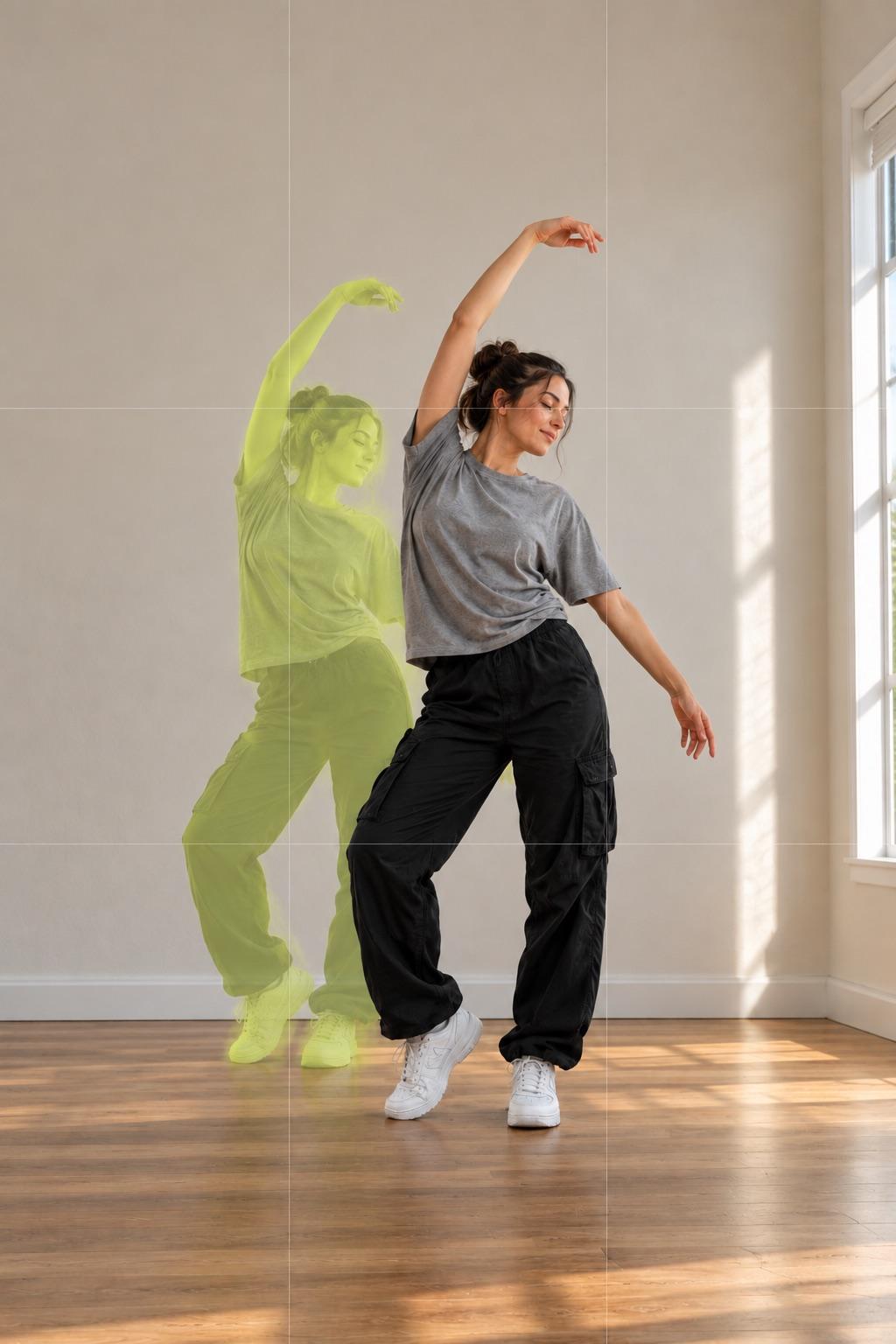
A dance transition works when the next clip starts in the exact pose and spot where the last one ended. MatchFrame's Dance project films in Clip mode with a 3-second timer and shows the end of your previous clip as a ghost, so you step straight back into position. Merge the takes into one video, or play up to four side by side in a grid.
Why these shots usually don't line up
Dance videos are filmed in short takes: a new outfit, a new spot, another try at the hard part. Between takes the phone gets moved and you come back a step closer or further, so the cut jumps and you change size on screen. In a split-screen of several takes it's worse: every cell is framed differently.
How to shoot it with MatchFrame
- 1
Start a Dance project
The Dance preset opens the camera in Clip mode with a 3-second timer, the Reels grid and the safe-area guide, so your moves stay clear of TikTok's buttons.
- 2
Film the first take
Prop the phone up, start the timer and dance. End the clip on a clear pose and hold it for a moment.
- 3
Step back into the ghost
The next clip shows the end of the previous one as a see-through layer. Match your feet, shoulders and arms, then record the next part, outfit or location.
- 4
Merge or grid
Merge the clips in order into one 9:16 video, or put 2 to 4 takes in a split-screen or grid that plays them all at once.
Tips
- Frame yourself head to toe with space above your head for jumps and arm moves.
- Cut on a movement: a spin, a drop, a jump or a hand over the lens.
- Learning a routine? Film day 1 and day 30 from the same spot and show them side by side.
- Grid videos are exported without sound. Add the trending sound in TikTok or Instagram so the post joins the trend.
Export it
Use 9:16 for TikTok and Reels. A merged video keeps the sound you recorded; split-screen and grid videos are silent, so add the song when you post. Shorter clips loop until the longest one ends.
Export layoutsQuestions
How do I do a dance transition on TikTok?
Keep the phone in the same place, end each clip in a pose and start the next clip in that same pose, then cut on a movement like a spin or a jump. A ghost overlay of the previous clip's last frame makes matching the pose quick.
Can I put 4 dance videos on one screen?
Yes. Select 2 to 4 clips in the export screen and choose split-screen or grid. They play at the same time in one video, and you can mix in a photo, such as a still of the final pose.
Does MatchFrame add music?
No. Merged videos keep the sound you recorded; split-screen and grid videos are silent. Add the song in TikTok, Instagram or your editor when you post.
Features used
- Video transitionsFilm each clip with the last one as a ghost overlay, so outfit changes, room reveals and match cuts land on the same frame. Then merge them in MatchFrame.
- Ghost overlay cameraMatchFrame shows your last photo or clip as a ghost on the live camera, so each shot matches its angle, distance and pose. Free on iPhone and Android.
- Export layoutsTurn aligned shots into a ready-to-post before/after: side by side, slideshow, GIF or grid, in 9:16, 4:5, 1:1 or 16:9, with labels, dates and your own text.
Other use cases
- Fitness progress photosTake gym and weight-loss progress pictures from the same spot, height and pose every time. Last week's photo as a ghost overlay replaces tape on the floor.
- Skincare before and afterSmall skin changes only show when light, angle and distance match. Use your last close-up as a ghost overlay to document a routine consistently.
- Hair growth progress photosTrack hairline, crown or length with photos taken from the same angle and distance. A ghost overlay of the last photo keeps every session comparable.
- Room makeover before and afterShoot your renovation, decor or declutter project from the exact same corner. The before photo as a ghost overlay lines up walls, windows and furniture.
- Outfit transition videosFilm outfit changes for TikTok and Reels with the last clip as a ghost overlay, so your pose, position and framing match at the cut. Merge clips in the app.
- Consistent product photosKeep the same angle, distance and position across a catalog, a listing refresh or a before/after, using a reference shot as a ghost overlay on your phone.
Take your reference shot today.
Free on iPhone and Android. No account needed.