
Film transition videos that line up, without a tripod mark
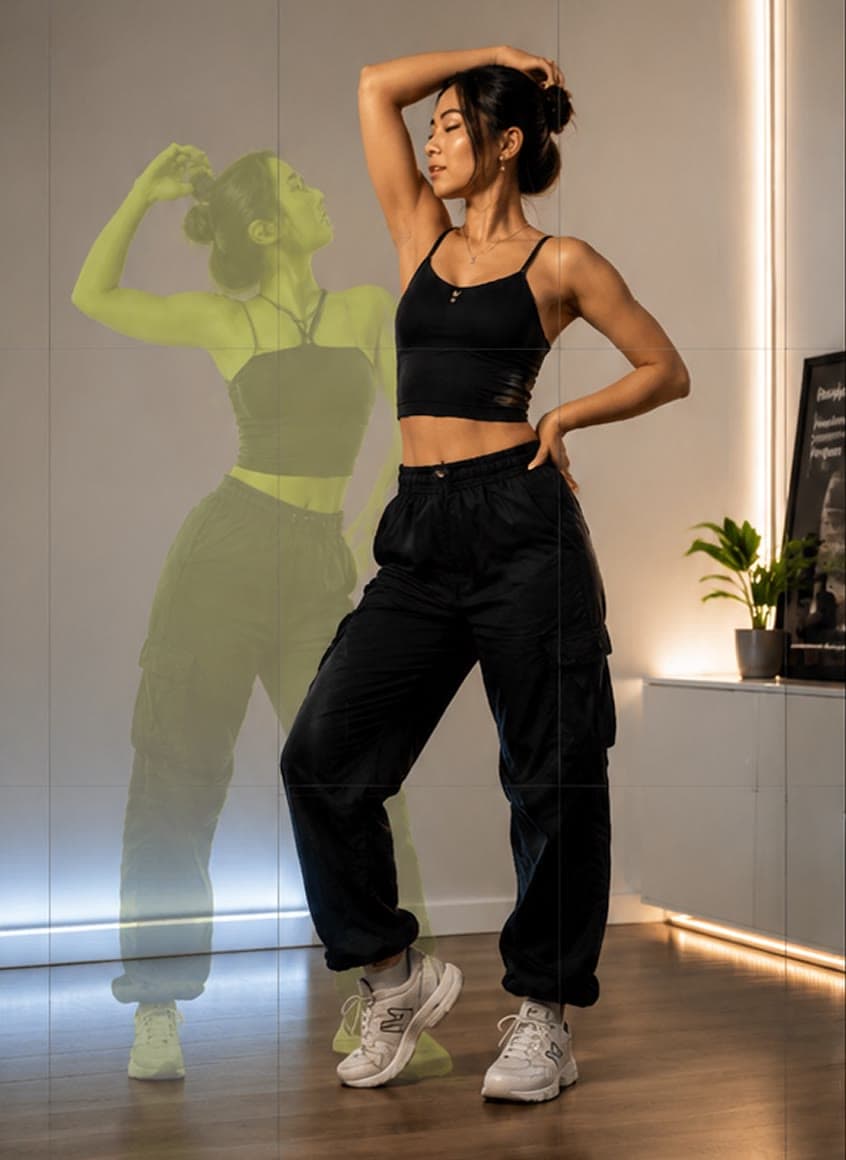
Transition videos only work when the second clip starts exactly where the first one ended. MatchFrame shows the previous clip's frame as a ghost overlay while you record, so you can line up body, phone and background, then merge the clips into one video for Reels, TikTok or Shorts.
How it works
- 1
Switch to Clip
Record the first clip in a project; it becomes the ghost for the next one.
- 2
Match the last frame
Line up with the ghost: same spot, same pose, same distance. Hands-free capture lets you start without touching the phone.
- 3
Merge and post
Select the clips in order and merge them into one video, or lay them out side by side or in a grid.
What's included
- Reels grid
- Frame vertical clips with a grid made for Reels, TikTok and Shorts.
- Cover frame
- Save any moment of a clip as a full-resolution photo to use as the video's cover.
- Split-screen
- Show clips next to each other or in a grid instead of one after another.
Good for
- Outfit transition videosFilm outfit changes for TikTok and Reels with the last clip as a ghost overlay, so your pose, position and framing match at the cut. Merge clips in the app.
- Room makeover before and afterShoot your renovation, decor or declutter project from the exact same corner. The before photo as a ghost overlay lines up walls, windows and furniture.
- Fitness progress photosTake gym and weight-loss progress pictures from the same spot, height and pose every time. Last week's photo as a ghost overlay replaces tape on the floor.
Questions
How do I make an outfit transition video?
Record the first outfit, then record the second with the first clip as a ghost overlay so your pose and position match. Merge the clips; the cut lands where the frames line up.
Do I need a tripod?
A stand helps, but the overlay is what keeps the frame consistent. You can hold the phone and still match the previous clip.
Other features
- Ghost overlay cameraMatchFrame shows your last photo or clip as a ghost on the live camera, so each shot matches its angle, distance and pose. Free on iPhone and Android.
- Before/after compareCompare any two shots in a MatchFrame project with a slider or side by side. They were aligned with the ghost overlay, so the difference you see is real.
- Export layoutsTurn aligned shots into a ready-to-post before/after: side by side, slideshow, GIF or grid, in 9:16, 4:5, 1:1 or 16:9, with labels, dates and your own text.
Take your reference shot today.
Free on iPhone and Android. No account needed.